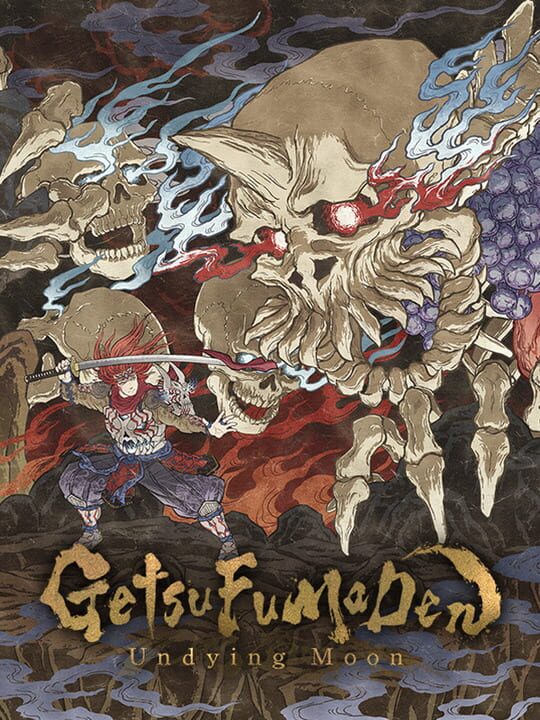
A Hack and slash/Beat 'em up game by GuruGuru, released in 2021
GetsuFumaDen: Undying Moon combines intense roguelite hack-and-slash action with a stunning dark fantasy world, brought to life through the stroke of traditional Japanese art. As the chosen leader and guardian of the land of the living, wield the otherworldy arsenal and powers of the Getsu clan as you descend deeper into the depths of Hell to eradicate the source of the cataclysm. Distinct Ukiyo-e Inspired Visuals Inspired by the Japanese ukiyo-e art style, the world of GetsuFumaDen is as beautiful as it is deadly. Vibrant, dynamic 2D animations bring the artistic world to life. Brutal, Larger than Life Boss Battles A reanimated demon lord, a colossal centipede, and a five-headed hydra are only some of the myriad massive and fearsome monsters and yokai standing in your way. Defend yourself against their relentless onslaught and emerge victorious to descend deeper into the depths of Hell. Dynamic, Weapon-Based Combat. Master the rythmn of intense sword fighting action: pacing and timings of movements are inspired by Japanese martial arts. Utilize the unique special moves of a wide range of weapon types including katanas, battle umbrellas and spears to outsmart your enemies. Authentic Roguelite Action While death is not the end, the world of Hell lives and breathes, presenting new map layouts and challenges to overcome with each attempt. Permanent upgrades, customizable weapons, and variable level progression provide new opportunities and challenges for every run. Immersive Weapon Enhancement System The crafting process gives you complete control over the ability to collect, enhance and unlock abilities of main and sub weapons. Unlock enhancements to your favorite weapons at each run, and get back in the action! Soul Devour Power-Up System Collect souls during each descent to power up in real time. Utilize the unique power-up system to dynamically and strategically select enhancements.
Current lowest price for GetsuFumaDen: Undying Moon PC key. Verified daily.
⚠️Unable to fetch store prices for GetsuFumaDen: Undying Moon.Please try again later.
The official download size for GetsuFumaDen: Undying Moon is 8 GB. Based on current hardware prices, this installation consumes approximately $0.48 worth of SSD storage space.
File Size
Est. SSD Cost
Estimated Time to Install
10 mins
Live player count and server population analysis.
There are currently 6 people playing GetsuFumaDen: Undying Moon, indicating a niche or private community. Coordinate via Discord for best results.
Manual backup locations for PC, Mac, and Linux.
SteamOS and Linux Proton performance analysis.
Don't let the "Unsupported" tag fool you. While Valve hasn't officially verified GetsuFumaDen: Undying Moon, ProtonDB users report it runs perfectly (Gold/Platinum rating). You may need to force a specific Proton version.
PC system requirements - Minimum vs Recommended specs.
To run GetsuFumaDen: Undying Moon smoothly, your PC needs at least 8 GB RAM RAM and a NVIDIA GeForce GTX 1660 Radeon RX 480 or equivalent GPU. Plan for 8 GB of storage.
Aggregated critic scores and player sentiment analysis.
Based on 2 critic reviews, opinion on GetsuFumaDen: Undying Moon is divided. While it offers some unique hack and slash/beat 'em up mechanics, the score of 71 suggests inconsistent execution. We recommend checking gameplay footage before buying.
Discover more games sharing similar genres.
