GamesOA Logo
GamesOver Analyzed
⌘K

GamesOA © 2026

The ultimate PC game compatibility database.

AboutPrivacy PolicyTerms of ServiceContact
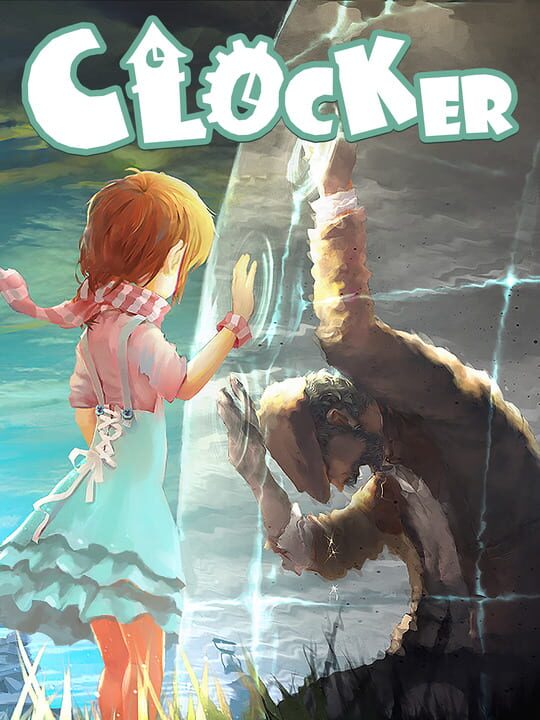
Clocker cover

Clocker

A Puzzle game by Wild Kid Games, released in 2019

70/100🔴Niche / Inactive⏳Proton PendingPC (Microsoft Windows)MacXbox One

Clocker is a puzzle game about father-daughter relationship. Love can touch us once and last for a lifetime, especially in a tale where we can control the time. The world has been swallowed into the grey void of time and space. The only key to the winding puzzle - a time-controling pocket-watch - lies in the hands of a clockmaker Father. Powerful and otherwordly, the watch creates a mysterious barrier between the Father and his estranged Daughter. Will they ultimately find each other, or both dissolve into the grey?

Single player

Buy Clocker - Best Price

Current lowest price for Clocker PC key. Verified daily.

Price unavailable
Real-time Clocker deals

⚠️Unable to fetch store prices for Clocker.Please try again later.

Clocker Download Size

The official download size for Clocker is 6 GB. Based on current hardware prices, this installation consumes approximately $0.36 worth of SSD storage space.

Standard Install

File Size

6GB

Est. SSD Cost

$0.36USD
100 Mbps
My Internet Speed100 Mbps
Quick Presets

Estimated Time to Install

8 mins

Is Clocker Dead?

Live player count and server population analysis.

🔴Niche / Inactive
0Players Online

There are currently 0 people playing Clocker, Data pending.

Current Activity24h Peak: 120
Estimated Match Wait: Long Wait / Discord Required
Live Data from SteamAPI

Where is the Clocker save file?

Manual backup locations for PC, Mac, and Linux.

Steam Cloud Supported
Copy
%USERPROFILE%\AppData\Local\Clocker\Saved\SaveGames

How to backup manually on Windows

  1. Press Win + R to open the Run dialog.
  2. Paste the path above and press Enter.
  3. Locate the save files (usually .sav, .json, or similar).
  4. Copy the entire folder to a backup location.
Copy
~/Library/Application Support/Clocker/Saves

How to backup manually on Mac

  1. Open Finder and press ⌘ + Shift + G.
  2. Paste the path above and click Go.
  3. Locate the save files in the folder.
  4. Duplicate the folder to create a backup.
Copy
~/.local/share/Clocker/Saves

How to backup manually on Linux

  1. Open a terminal and use cd to navigate to the path.
  2. Or use your file manager and press Ctrl + L to enter the path.
  3. Locate the save files (.sav, .json, or game-specific format).
  4. Copy the folder with cp -r or your file manager.
Source: PCGamingWiki ↗

Is Clocker Steam Deck Compatible?

SteamOS and Linux Proton performance analysis.

Valve Official🚫Unsupported
Community Rating⏳ Proton Pending

Performance Analysis

Compatibility data for Clocker is currently mixed. Check recent ProtonDB reports for specific launch commands.

Confidence: Moderate
See 1 user configs ↗

Can I Run Clocker?

PC system requirements - Minimum vs Recommended specs.

To run Clocker smoothly, your PC needs at least 8 GB RAM RAM and a GeForce 780 or equivalent GPU. Plan for 6 GB of storage.

Minimum1080p / 30 FPS
  • 💻
    OS7
  • ⚡
    CPU1.8 GHz
  • 🧠
    RAM4 GB RAM
  • 🎮
    GPUIntel HD 4000 Series
  • 💾
    Storage5 GB available space
Recommended1440p / 60 FPS
  • 💻
    OS10
  • ⚡
    CPU2.4 GHz
  • 🧠
    RAM8 GB RAM
  • 🎮
    GPUGeForce 780
  • 💾
    Storage6 GB available space
Download Size
6 GBSmall

Is Clocker Good?

Aggregated critic scores and player sentiment analysis.

70
Rated 70 out of 100
Mixed Reviews1 Verified Reviews

The Verdict

Based on 1 critic reviews, opinion on Clocker is divided. While it offers some unique puzzle mechanics, the score of 70 suggests inconsistent execution. We recommend checking gameplay footage before buying.

Other games you may like

Discover more games sharing similar genres.

2015

Undertale

View Details
2011

To the Moon

View Details
2013

Rogue Legacy

View Details
2014

Divinity: Original Sin

View Details
2022

Tunic

View Details
2018

Minit

View Details
2018

CrossCode

View Details
2017

Hello Neighbor

View Details