GamesOA Logo
GamesOver Analyzed
⌘K

GamesOA © 2026

The ultimate PC game compatibility database.

AboutPrivacy PolicyTerms of ServiceContact
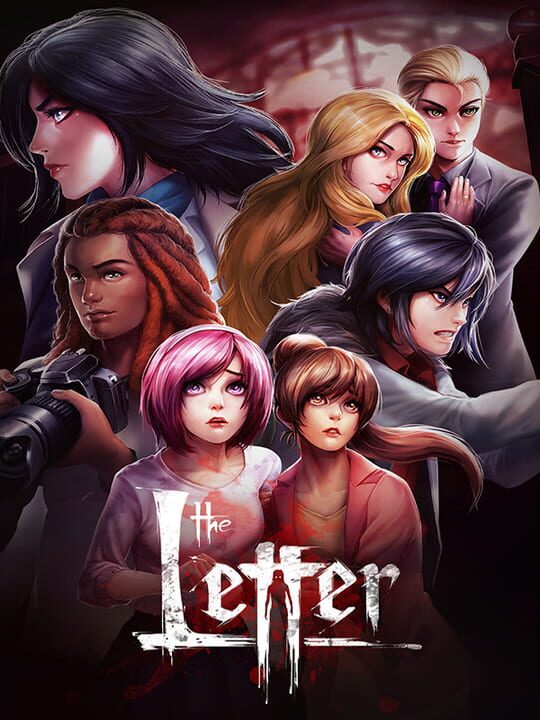
The Letter cover

The Letter

A Role-playing (RPG) game by Yangyang Mobile, released in 2017

No Rating🔴Niche / Inactive⏳Proton PendingXbox Series X|SPlayStation 4Linux

When seven people fall prey to a vicious curse, they will discover that horror rests not from the shadows lurking about, but within themselves. To what ends will one go in order to survive?

Single player

Buy The Letter - Best Price

Current lowest price for The Letter PC key. Verified daily.

Price unavailable
Real-time The Letter deals

⚠️Unable to fetch store prices for The Letter.Please try again later.

The Letter Download Size

The official download size for The Letter is 5 GB. Based on current hardware prices, this installation consumes approximately $0.30 worth of SSD storage space.

Standard Install

File Size

5GB

Est. SSD Cost

$0.30USD
100 Mbps
My Internet Speed100 Mbps
Quick Presets

Estimated Time to Install

6 mins

Is The Letter Dead?

Live player count and server population analysis.

🔴Niche / Inactive
6Players Online

There are currently 6 people playing The Letter, indicating a niche or private community. Coordinate via Discord for best results.

Current Activity24h Peak: 7.2
Estimated Match Wait: Long Wait / Discord Required
Live Data from SteamAPI

Where is the The Letter save file?

Manual backup locations for PC, Mac, and Linux.

Steam Cloud Supported
Copy
%USERPROFILE%\AppData\Local\TheLetter\Saved\SaveGames

How to backup manually on Windows

  1. Press Win + R to open the Run dialog.
  2. Paste the path above and press Enter.
  3. Locate the save files (usually .sav, .json, or similar).
  4. Copy the entire folder to a backup location.
Copy
~/Library/Application Support/TheLetter/Saves

How to backup manually on Mac

  1. Open Finder and press ⌘ + Shift + G.
  2. Paste the path above and click Go.
  3. Locate the save files in the folder.
  4. Duplicate the folder to create a backup.
Copy
~/.local/share/TheLetter/Saves

How to backup manually on Linux

  1. Open a terminal and use cd to navigate to the path.
  2. Or use your file manager and press Ctrl + L to enter the path.
  3. Locate the save files (.sav, .json, or game-specific format).
  4. Copy the folder with cp -r or your file manager.
Source: PCGamingWiki ↗

Is The Letter Steam Deck Compatible?

SteamOS and Linux Proton performance analysis.

Valve Official🚫Unsupported
Community Rating⏳ Proton Pending

Performance Analysis

Compatibility data for The Letter is currently mixed. Check recent ProtonDB reports for specific launch commands.

Confidence: Moderate
See 2 user configs ↗

Can I Run The Letter?

PC system requirements - Minimum vs Recommended specs.

To run The Letter smoothly, your PC needs at least 2 GB RAM RAM and a GTX 260 or equivalent or equivalent GPU. Plan for 5 GB of storage.

Minimum1080p / 30 FPS
  • 💻
    OSWindows XP/Vista/7/8/10
  • ⚡
    CPUIntel® Core 2 Duo
  • 🧠
    RAM2 GB RAM
  • 🎮
    GPUGTX 260 or equivalent
  • 💾
    Storage5 GB available space
Download Size
5 GBSmall

The Letter Review Score

Pending critic evaluation. Check back soon for the official verdict.

Other games you may like

Discover more games sharing similar genres.

2017

Pyre

View Details
2023

Slay the Princess

View Details
2017

Emily Is Away Too

View Details
2014

2064: Read Only Memories

View Details
2017

Simulacra

View Details
2012

Long Live the Queen

View Details
2020

Death and Taxes

View Details
2021

The Life and Suffering of Sir Brante

View Details